Momentum AMS does not configure or manage PL Rating for agencies. Once a Personal Lines quote application is completed in Momentum, the system securely pushes that application into Vertafore’s PL Rating so agents can continue the quoting process directly in the rater. All rating activity, underwriting questions, and carrier responses occur inside PL Rating — not inside Momentum AMS.
Overview
PL Rating is Vertafore’s Personal Lines comparative rater. Momentum AMS integrates with PL Rating by enabling users to:
Build the Personal Lines application in Momentum
Push the application directly into PL Rating
Complete the rating, carrier comparisons, and binding inside Vertafore’s rater
Momentum acts as the data collection and export system, not the quoting engine.
There is:
No PL Rating setup inside Momentum
No credential storage
No return of rating results into Momentum
Creating a Personal Lines Quote Application
Before a quote can be sent to PL Rating, the user must complete a Quote Application inside Momentum.
Navigate to:
Insured Profile → Quotes → Quote Applications List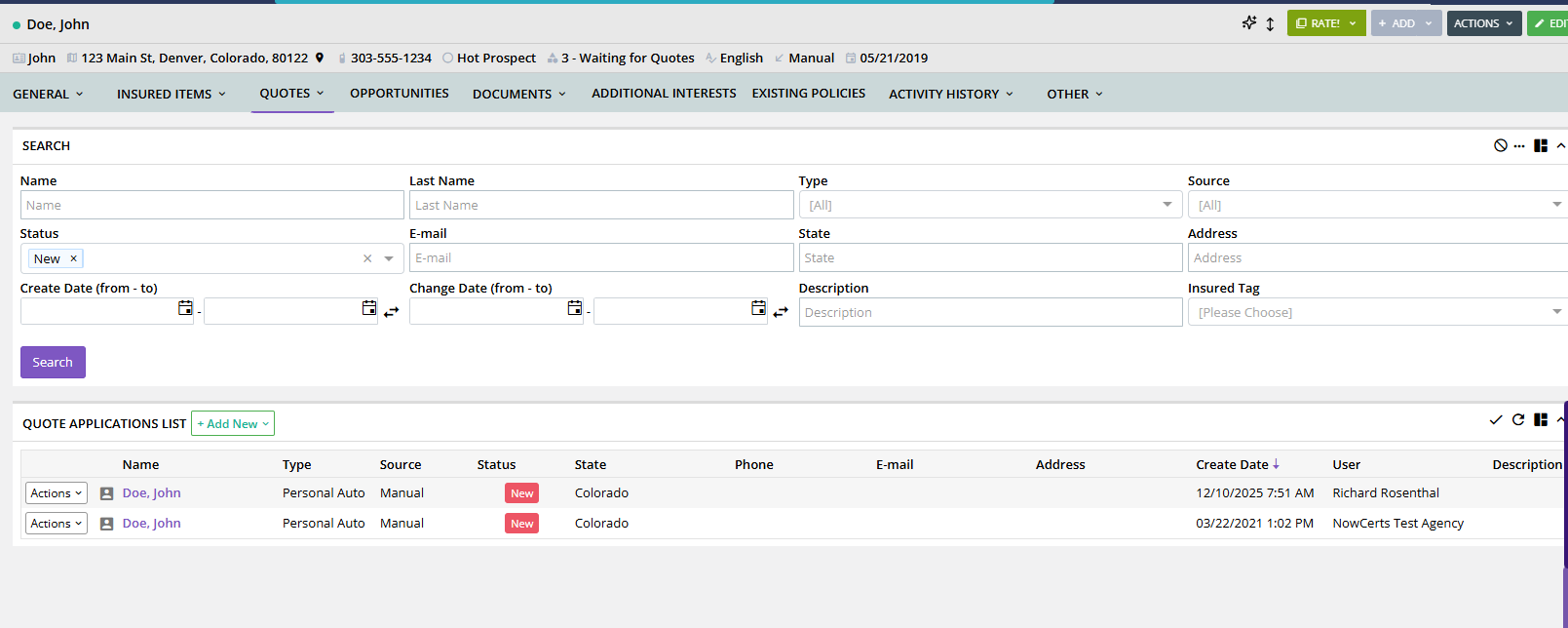
From this screen, users can:
Add a new Personal Lines quote application
Edit existing applications
View status (New, In Progress, Completed)
Access the Actions menu for processing
How to Create a New Quote Application
Click + Add New
Select the Personal Lines type (e.g., Personal Auto, Homeowners)
Enter the insured, driver, vehicle, property, loss, and coverage information
Save the application
The quote will now appear in the Quote Applications List.
Sending the Application to PL Rating
Once the quote application is complete, it can be transmitted to PL Rating.
Step-by-Step: How to Send to PL Rating
Open the insured’s record
Go to the Quotes tab
Scroll to the Quote Applications List
Find the correct application
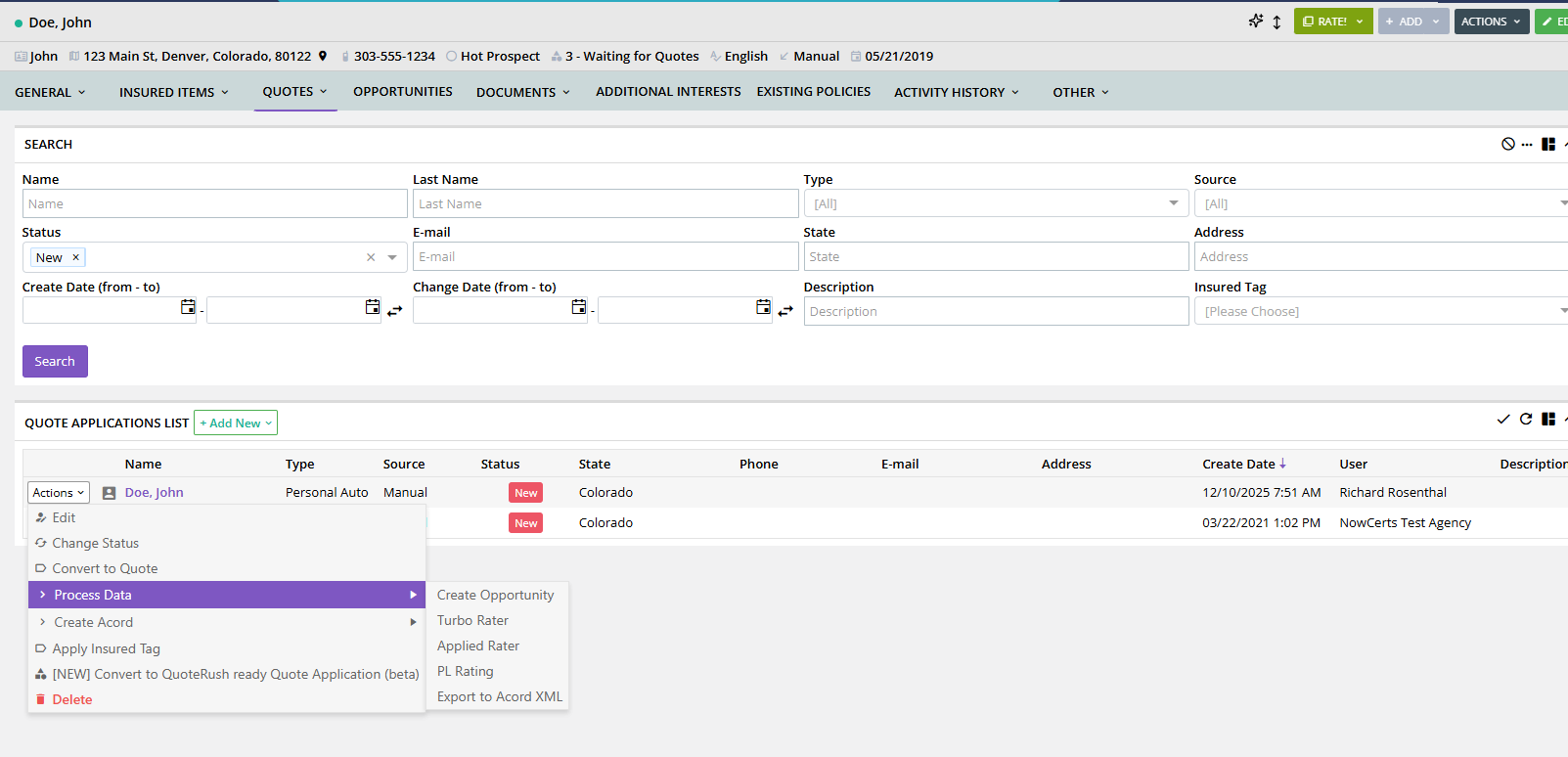
Click the Actions dropdown
Hover over Process Data
Select PL Rating
Exact Path:
Actions → Process Data → PL Rating
What Happens After You Click “PL Rating”
When you select PL Rater, Momentum:
✔ Packages the entire quote application data
✔ Sends it through the PL Rating integration
✔ Opens Vertafore PL Rating in a new browser window (or login prompt)
✔ Allows the user to continue the quoting process within PL Rating
Momentum’s role ends at the export.
All rating is performed inside PL Rating.
Completing the Rating in PL Rating
Inside PL Rating, agents will:
Answer underwriting questions
Select participating carriers
Run comparative rates
View premium results
Generate proposals
Complete the bind workflow (inside Vertafore ecosystem)
Momentum AMS does not influence or interact with PL Rating’s rating logic.
Do Rates Return to Momentum AMS?
No.
This is a one-directional workflow:
Momentum → PL Rating (application export)
PL Rating → Momentum (no rate return)
After binding in PL Rating, the agent will manually enter:
Carrier
Policy number
Premium
Billing type
Fees and taxes
Any endorsements
into Momentum AMS to finalize the policy record.
What Momentum AMS Does NOT Do
Momentum does not:
Store PL Rating credentials
Manage PL Rating user access
Display comparative rates
Retrieve pricing or underwriting results
Sync questions or carrier responses
Bind policies inside Momentum
All rating occurs externally in PL Rating.
Best Practices
✔ Complete all fields before sending
Missing data could cause more re-entry inside PL Rating.
✔ Keep your PL Rating login credentials updated
Momentum does not authenticate on your behalf.
✔ Follow a consistent quote entry workflow
Consistency ensures cleaner data for the rating handoff.
✔ Return to Momentum after binding
Enter all final policy details immediately to keep the AMS accurate.
FAQ
Is any setup needed inside Momentum for PL Rating?
No. PL Rating is completely external and requires no setup in Momentum.
Can agencies customize what information Momentum sends?
Not currently. The data packet is standardized.
Why can’t rates return to Momentum?
PL Rating does not support a return feed of rating data into Momentum at this time.
Does sending the application create a policy automatically?
No. Users create the policy manually once coverage is bound.
Need Assistance?
If your quote applications are not exporting to PL Rating correctly, or if PL Rating does not launch when selected, please reach out to Momentum Support.
Was this article helpful?
That’s Great!
Thank you for your feedback
Sorry! We couldn't be helpful
Thank you for your feedback
Feedback sent
We appreciate your effort and will try to fix the article