This update introduces enhanced search capabilities, improved reporting filters, expanded pipeline visibility, and customizable workspace options designed to help agencies find information faster and manage workflows more efficiently.
Search and Navigation
Advanced Search Filters
You can now perform more precise searches directly from the search bar using commands such as:
start=
end=
These commands help quickly locate records based on date ranges and other criteria.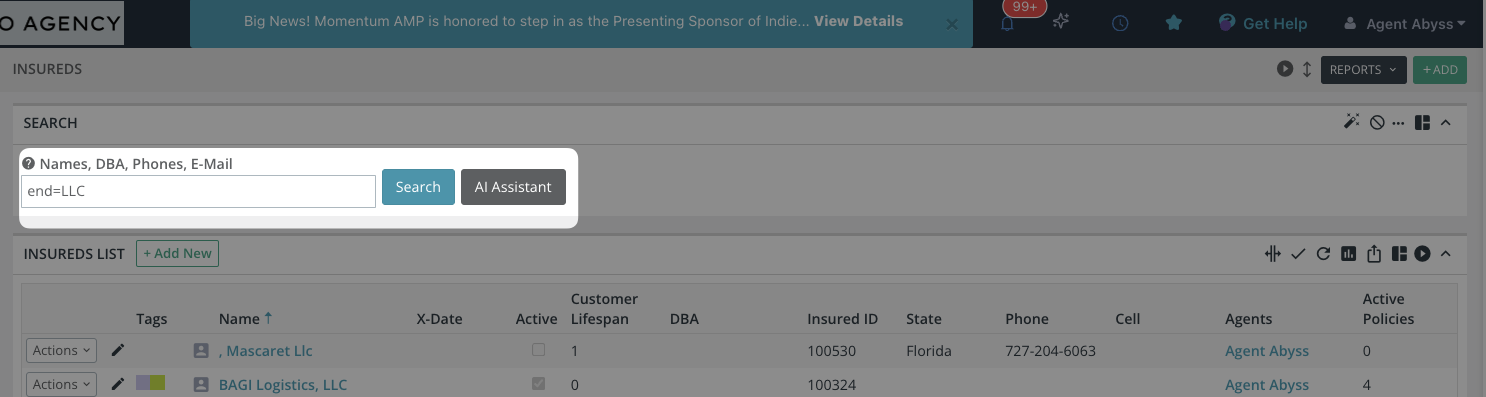
Smart Report Links
New suggested report links now appear directly within key list views, allowing you to access relevant reports instantly without navigating away from your current workflow.
Filter Tracking
The Search Configurator now displays the number of filters currently applied, making it easier to manage complex searches and understand exactly how your results are being filtered.
Custom Workspace
The AI Side Panel can now be pinned or unpinned depending on your workflow needs.
This allows users to:
Keep AI insights visible while working
Hide the panel for a larger workspace when needed
Precise Activity Logs
System activity logs and SMS history now feature:
Improved search accuracy
More consistent time-stamping
This helps teams review communication history and system actions more reliably.
Reporting Enhancements
One-Click Commission Files
Agent Commission Statements now allow you to generate and download commission files directly from the statement view.
Enhanced Cross-Selling Insights
You can now select multiple Lines of Business simultaneously when running cross-sell reports, helping identify broader opportunities across your book of business.
Financial Insights
The Premium field has been added as:
A column in the Policy Report list
A searchable filter
This makes it easier to quickly analyze revenue-related data.
Regional Commission Tracking
Agency Commission reports now support filtering by State, providing improved visibility into geographic production and revenue distribution.
Tasks and Opportunities
Full Pipeline Visibility
The Task List now shows the status of related:
Opportunities
Workflow Checklists
This eliminates the need to open multiple screens to understand pipeline progress.
Detailed Opportunity Tracking
Within the Opportunity List, you can now view all related:
Tasks
Workflow Checklists
This helps ensure nothing is missed during the sales or renewal process.
Workflow Insights
Additional activity tracking has been added to key opportunity actions, giving agencies better insight into how their sales workflows are progressing.
One Pager View (CRM View)
Note: The One Pager View is an optional feature. Contact Support if you would like it enabled for your agency.
Tailored Client Views
Customize the One Pager layout with improved organization options including:
Service requests
Tags
Layout adjustments
This allows agencies to tailor the screen to their workflow.
Smart Note Management
Notes are now more actionable:
Add reminder alerts to notes
Convert notes into tasks instantly
This helps teams manage follow-ups more efficiently.
Note History
The most recent note added to a client record is now visible directly in the One Pager view, giving users immediate context when reviewing a client.
Was this article helpful?
That’s Great!
Thank you for your feedback
Sorry! We couldn't be helpful
Thank you for your feedback
Feedback sent
We appreciate your effort and will try to fix the article