Momentum AMS offers a 30-day free trial, and during this time you can switch plans, upgrade, downgrade, or modify your subscription at any point. Whether you're moving from Professional to Business, Starter to Professional, or simply exploring available options, the process is the same.
This guide explains how to change your trial plan, where to find the subscription settings, and what to expect regarding billing and trial conversion.
Step-by-Step Guide: Switching, Upgrading, or Modifying Your Momentum AMS Trial Subscription
If you need to switch plans, upgrade, downgrade, or modify your subscription, this guide will walk you through the process.
These instructions apply whether you're moving from Professional → Business, Business → Starter, upgrading to a higher tier, or simply exploring what each plan includes.
Log Into Your Account
Sign in to your Momentum AMS trial account.
Hover over your name in the top-right corner of the dashboard.
Access Subscription Settings
From the dropdown menu, click Subscription & Payments.
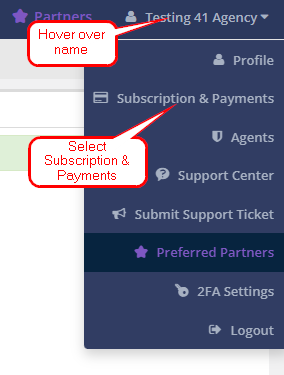
Here you’ll see:
Your current trial plan
Trial expiration date
Included users
Plan comparison options
You can change, edit, modify, upgrade, or downgrade your subscription from this screen.
Review Available Plans
Momentum AMS offers four subscription tiers starting at $99/month.
Each tier includes different features and a set number of users.
You can also add additional users beyond the included amount if needed.
Select a New Trial Plan
From the dropdown, choose the plan that best fits your agency’s needs.
Review features and limits to ensure the plan supports your workflow and staff size.
Initiate the Change
Click Modify Subscription to update your plan.
⚠️ Important:
When you first signed up, you added a credit card.
You will not be charged during the trial.
After the trial ends, your account will automatically convert to the selected plan unless you cancel before the end of your 30-day trial.
Confirm the Switch
Review your changes.
Confirm to finalize the update.
Review Confirmation
You’ll see a success notification in the bottom-right corner.
You may also receive an email showing a $0.00 confirmation.
Explore New Features
If the updated plan unlocks new features, tools, or integrations, feel free to explore them during your trial.
Important Notes
IVANS Carrier Downloads are not available during the free trial.
To activate IVANS, contact the Billing Department at (801) 999-0550, option 2 to terminate your trial early and convert to a paid subscription.
Best Practices
Always review your selected plan before confirming to avoid being converted to the wrong tier after your trial ends.
Make sure any added users are accounted for when choosing your subscription.
If you are unsure which plan is best, compare features in the Subscription & Payments section before switching.
Need Help?
If you encounter issues or have questions:
Call: (801) 999-0550, option 2 (Billing)
Email: help@nowcerts.com
Our Billing Support team can walk you through the process and ensure your trial or subscription change is successful.
Was this article helpful?
That’s Great!
Thank you for your feedback
Sorry! We couldn't be helpful
Thank you for your feedback
Feedback sent
We appreciate your effort and will try to fix the article